
Help center › Auto repair shops
Shop invoice numbering, language and disclaimer
The admin sets up shop invoices in Settings → 🔧 Shop.
Set up your invoices
- In the menu, tap Settings, then the 🔧 Shop tab.
- Invoice Numbering: enter the next number (for example 00001 or 5512) and tap Reset Numbering. Leading zeros are kept.
- Invoice Language: tap 🇩🇴 Español or 🇺🇸 English. It saves right away.
- Disclaimer: type your warranty or terms text and tap Save Disclaimer. It prints next to the totals.
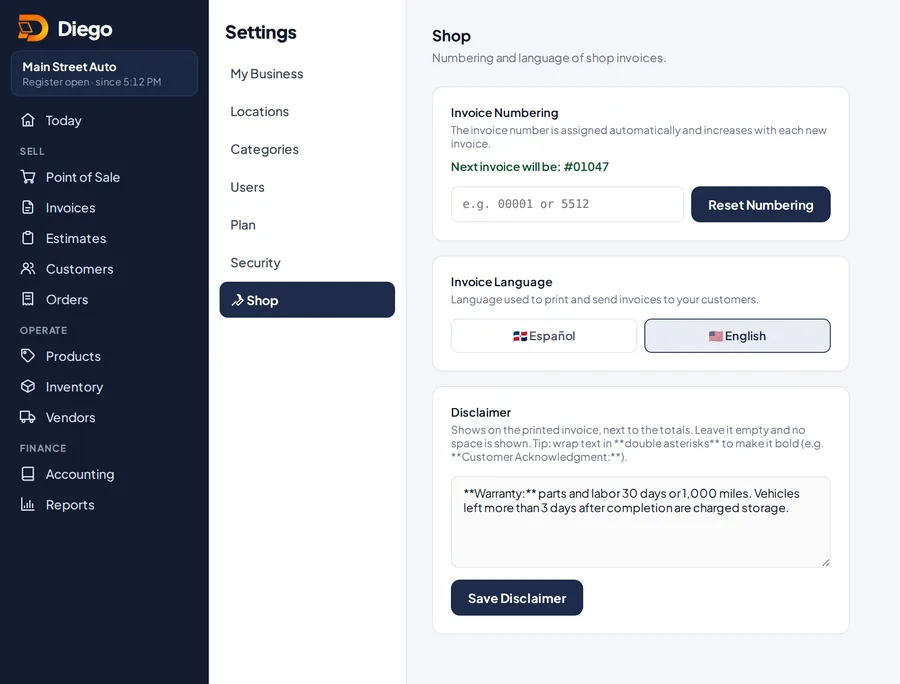
The Shop tab in Settings.
Related articles
Create a shop invoice with the vehicleCreate a shop invoice with the customer, their vehicle, the repair order, mileage, parts and labor.Set up your business detailsAdd your logo, name, address, EIN, sales tax rate and receipt message so your receipts and invoices show your business details.Shop staff and commissionsAdd technicians and service advisors, put them on every invoice and calculate their commissions when the customer pays.
Still have questions?
Write to us and we'll reply within one business day.